Accessing and Navigating the Warranty Module

Users typically begin from the main BuildBase dashboard and can navigate to the Warranty module from the panel or the sidebar menu.
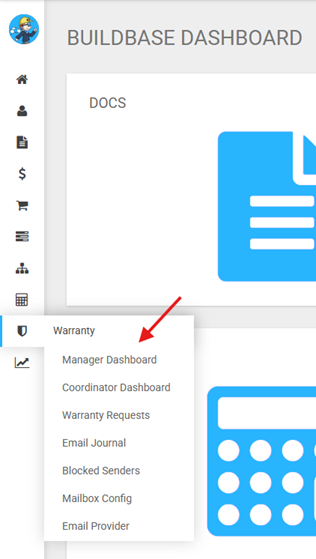
- Manager Dashboard - Provides Warranty Managers with a high-level view of all warranty requests, including assignments and status roll-ups. It serves as a starting point for navigating into filtered request lists and detailed records, and supports creating requests received outside of email.
- Coordinator Dashboard - Provides Warranty Coordinators a quick overview of requests assigned them. Warranty Coordinators often use this dashboard as a starting point
- Warranty Requests - Displays all requests the logged-in user has permission to view. The list can be filtered by assigned coordinator, status, closed window, priority, aging, or by using a freeform search. Note that the search does not include warranty notes or the body of linked emails.
- Email Journal — Displays all emails sent to the configured mailbox (excluding blocked senders) for review. The list includes built‑in views and can be filtered by classification, email status, review status, or freeform search. It can also be sorted by sender, received date, and subject. Users can take action on emails directly from the list.
The following selections are only available to users with the Warranty Manager role.
- Blocked Senders – Enables the management of email addresses blocked from flowing emails into the email log.
- Mailbox Config – Enables the configuration and administration of email functionality.
- Email Provider – Enables the configuration and administration of email functionality.