Introduction
Administration
Vendors & Partners
Purchase Order Views
Submitting an Invoice
Construct Schedule
Task Notes for Vendors
Payments/Remittance Advice
Vendor Export POS
Project Management
Purchasing and Estimating
Invoicing
Items
Introduction To Items
Navigating Items
When to Create a New Item
Unit of Measure
PO - BoM on Purchase Orders
Cost Model - Budgets
Bulk Item Creation and Modification Tools
Items FAQ
Attributes
Item Costing & Primary Vendors
Classification Codes
Creating Styles/Pallets/Storyboards
Jobs/Projects
Non-Job Purchase Orders
Construct
Introduction To Construct
Apply a Schedule - Prepare
Manage Construction Templates
Construction Dashboard
Delay Notes
Undo Task
Plan - Assign Start Date
Subtasks and Worksets
Task Notes
Sales
Sales Document Configuration
Sales Model Template Configuration
Sales Regions
Update Upgrade/Option Pricing
Docs
Introduction to Docs
Uploading a Document
Configuring Categories and Types
Bulk Permission Assignment
Reporting
Warranty
Introduction to Warranty
Accessing and Navigating the Warranty Module
Dashboards
Reviewing and Triaging Warranty Requests
Creating Warranty Requests
Find and Manage Warranty Jobs
Managing Warranty Requests
Managing Deficiencies and Work Orders
Closing Warranty Requests
Accounting
- All Categories
- Purchasing and Estimating
- Invoicing
- Invoice Approval Workflow
Invoice Approval Workflow

Invoice workflow approvals follows two approval process.
- Automatic Invoicing
- Manual Invoicing
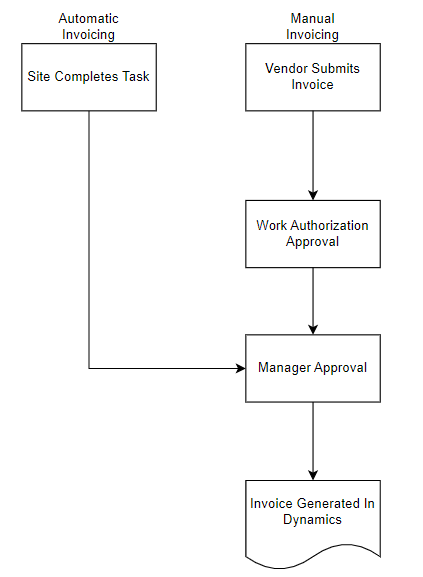
Automatic Invoicing
If a purchase order is linked to a task in the construction schedule and the home builder is configured for automatic invoicing, when the site manager completes the task in the construction schedule the purchase order will automatically be invoiced on behalf of the vendor and automatically approved by the site manager.
Automatic Invoices will start with INV_
Manual Invoicing
Invoices submitted manually by a vendor will need to be approved by the site manager in the work authorization screen.
Manager Approvals
Once the invoice has received site manager approval (either automatically or manually), a manager at the home builder needs to approve the invoice.
Once the invoice is approved, it will automatally post into Dynamics.